Google Chrome is Google’s browser project. This comic book tells you about it:
Category: Allgemein
UPA Europe
Anybody going? 4-6 December, Turin, Italy. I already signed up for it 🙂
http://www.upaeurope2008.org/
iPhone GUI PSD
iPhone mockup builders watch out. Teehanlax provide a very nice iPhone GUI Photoshop file, which you can downoad here. It is still work in progress and gets updated…

Thanx to the guys from http://www.teehanlax.com for sharing this.
Technorati-Tags: iPhone, teehanlax
Visual Explainations als Kunstwerk
Wußten Sie, dass jeden Tag vier Millionen Kaffeebecher in amerikanischen Airlines verbraucht werden?
Oder dass jeder vierte Gefängnisinsasse aus den USA kommt?
Oder dass sich hundertausende amerikanische Teenagerinnen monatlich die Brüste vergrößern lassen?
Und ändert es etwas, dass Sie diese Information nun besitzen?
Chris Jordan hat es sich zum Ziel gesetzt, dass sich etwas ändert und einen diese Informationen nicht länger kalt lassen. Visual Explainations als Kunstwerk, das ist ziemlich spannend. Auch wenn Chris Jordan für Europäer möglicherweise etwas pathetisch wirkt… das Video ist eine absolute Empfehlung.
It’s all about Infographic, baby.
Via Hannes Treichl, Spreeblick, TED
Technorati-Tags: ted, chris jordan
Server Downtime
On Friday, 8th of August this site will not be avaliable from 22pm until 00am because of a WordPress Upgrade to version 2.6. We are sorry for any inconvenience.
Sincerly, the Admin Team of Interaction Design Blog Vienna
Update 08.08.2008 23:01: WordPress Upgrade to version 2.6 unsuccessful because of the following “ERROR: WordPress 2.6 requires MySQL 4.0.0 or higher“. Hopefully this can be managed by one of the co-Admins 🙂
Eingabehilfen
Das Problem dürfte ja weitgehend bekannt sein. Angenommen wir haben eine Art Aufgabenliste. Wie kann mich das System unterstützen, um nicht bei jedem Gedanken, den ich festhalten möchte, immer wieder von neuem Datum, Priorität, zugehöriges Projekt, usw. eingeben zu müssen? Meiner Meinung nach gibt es folgende Ansätze:
- Der Task wird direkt eingegeben …
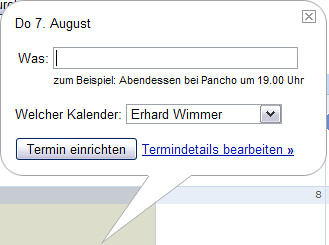
… und die “unwichtigeren” Attribute werden später hinzugefügt

Das System schlägt mir etwas vor- Ich habe die Möglichkeit über ein Kontextmenu die wichtigsten Attribute direkt einzugeben.
Beim Beispiel mit der Taskliste wären das dann natürlich Datum, Priorität, usw. (statt wie im Bild Font, Größe, …)

Momentan fällt mir dazu leider nicht recht viel mehr ein.
Bin für Eure Mithilfe dankbar,
lg, Erhard
44. interaction design stammtisch
obwohl es sommer + heiß ist gibt’s wieder einen interaction design stammtisch
dienstag, 12.8.2008 um 19:00 uhr
im werkzeugH, 1050 wien, schönbrunnerstr 61 [öffis: u4 pilgramgasse, 14a, 13a, 12a, 59a]
“bring’ 2 folien” hat bei den letzten stammtischen super funktioniert und darum: jede, die möchte, bringt 1-2 slides über das, was sie gerade im bereich interaction design, usability, … beschäftigt/interessiert mit … und stellt sie vor!
der interaction design stammtisch findet jeden monat am 2. dienstag statt. jede, die sich für die themen interaction design, usability, accessibility, user interface design, … interessiert, ist herzlich eingeladen
anmeldung ist keine notwendig
ps: nächstes mal gibt’s wirklich wirklich — falls frau sonja dieses mal slides mitbringt — auch einen neuen reminder text … versprochen, aber nur dann
Silverback
is a spontaneous, unobtrusive usability testing software for designers and developers. Free trial at silverbackapp.com
Video Prototyping
In a project from 1992 (!) called “STARFIRE A Vision of Future Computing“ the well know Interaction Designer Bruce Tognazzi “… launched a project at Sun Microsystems in an effort to both predict and guide the future of computing…
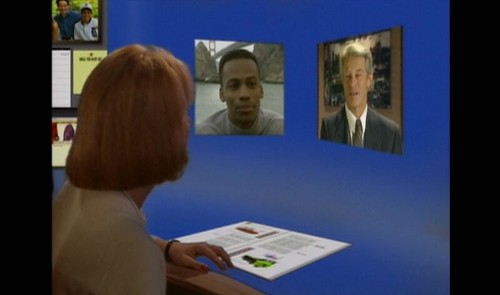
http://asktog.com/starfire/starfire.mp4
…The output of this effort was threefold:
- Starfire, the Movie, showing a day in the life of a knowledge worker in the far-off distant year, 2004.
- Starfire, the Book, entitled Tog on Software Design, which not only covers the film in intimate detail, but lays out several more equally thought-provoking scenarios developed during the initial phase of the project.
- Starfire, the Paper, originally published in CHI Proceedings, outlining the rules we followed in attempting to build a scientifically accurate video prototype…
(from: http://asktog.com/starfire/) Unfortunately I couldn’t find an embedded version of the video but please enjoy it under the following link. It’s real fun, because some of the occurring things remind me on (meanwhile) existing apps like iChat,…

http://www.skypejournal.com/blog/archives/images/iChatTiger.jpg
But again (like mentioned in Paper), I am fascinated about the opportunities of prototypes. In that case the video really gives you a clear imagination of “things” which do not exist yet. And this can definitely help e.g. collect feedback from users, or to get venture capital for a new product, … Technorati-Tags: bruce tognazzi, starfire, video prototyping
Contextual User Interfaces: Neuer Trend?
Auf ReadWriteWeb gibt’s einen interessanten Artikel zum Thema Contextual User Interfaces:
Strikingly, the recent wave of UI innovation is proving exactly the opposite. Users are not stupid, and in fact, they were overwhelmed with choices presented in traditional UIs. The new interfaces are winning people over because they are based on usage patterns instead of choices. The key thing about new UIs is that they are contextual – presenting the user with minimal components and then changing in reaction to user gestures. Thanks to Apple, we have seen a liberating movement towards simplistic, contextual interfaces. But can these UIs become the norm? In this post we take a look at the rise of the contextual UI and ponder if they will cross the chasm.
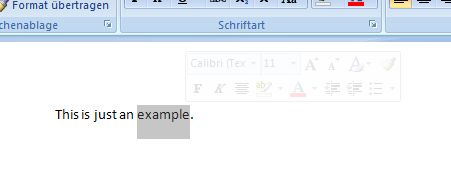
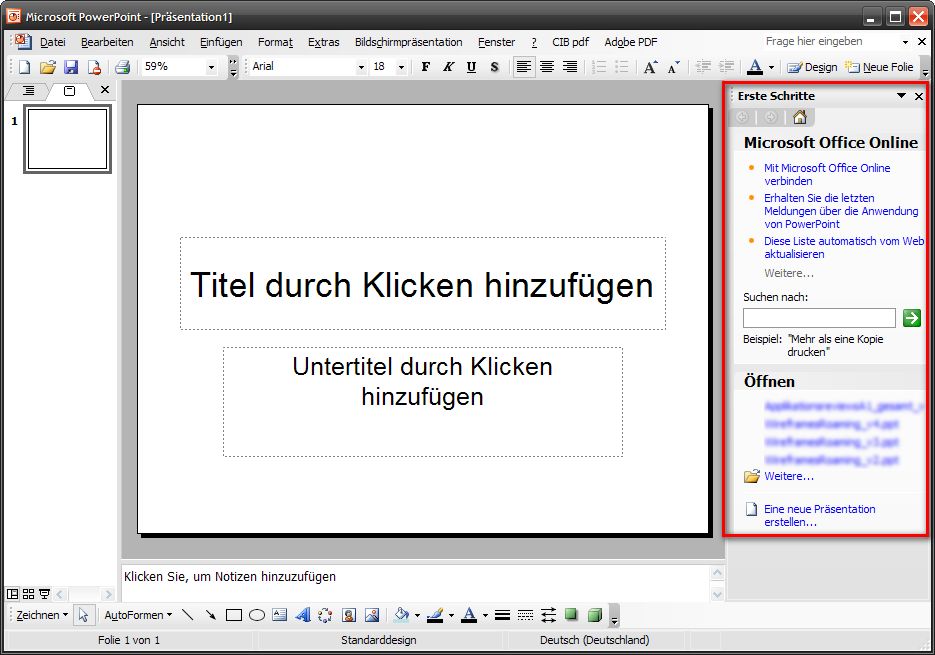
Sind diese User Interfaces aus eurer Sicht etwas Neues? Meiner Meinung nach gab es so etwas, zumindest ansatzweise, schon früher. In den Kommentaren wird ja auch auf den Aufgabenbereich von Microsoft Office 2003 verwiesen (im Screenshot rot markiert). Neu ist allerdings das Ausmaß der Reduktion von Interface Elementen. Office zeigt ja neben dem Aufgabenbereich auch alle anderen Menüs an und bietet so zwei verschiedene Zugänge an.
Nachtrag:
Direct Manipulation in Microsoft Word 2007 :